JohnLyu的blog

橙汁事务所艾欧泽亚分部

0%

工具准备

即将参加网鼎杯线下赛, 环境完全未知, 想到哪里写到哪里吧.

  • [] 能读U盘能插网线能ssh的电脑一台 😂
  • [] 不确定实际环境中是否有Nginx, 甚至不确定是否有编译环境, 最好能有Nginx源代码和binary各一份.
  • [] 很多PHP的漏洞都是基于特定的, 低版本的PHP, 这个可以考虑带一份最新版本的PHP安装包
  • [] 弱口令爆破工具一份(御剑走起)
  • [] autopwn一份
  • [] 一键WAF一份, 例如ModSecurity, 如果能定制最好, 感觉AWD的waf可以尽量严格, 比如query只允许纯字母数字,且不允许显含flag之类的, 哪里被check了再放开
  • [] 自动漏洞审计工具一份
  • [] 后门查杀工具一份
  • [] nmmap
  • [] sqlmap
  • [] XSStrike
  • [] wireshark, tcprelay以及配套的流量监控, 重放脚本
  • [] 已有的攻防脚本: Prepare-for-AWD
  • [] 准备好知乎答案, "泻药, 人在深圳, 刚下飞机, 网鼎杯..."

再就是CTF本身就需要的工具了, 但是似乎只有web和pwn比较重要...最好让他们担任攻击手, 能尽快的写出payload

理想的流程

  1. 确保己方shell/文件, 拿到SSH的时候立刻更换端口, 修改密码, 禁止密码登陆, 据说还有给自己种几个netcat的玩法, 防止SSH被点爆.
  2. 审计服务器的全部开放端口, 看看都启动了什么服务, 以及, 是否有数据库裸奔等现象.
  3. 如果环境合适, 直接上WAF, 免得在这一步就被打爆
  4. 审查代码, 修掉一眼能看出来的后门/漏洞
  5. 查看网络拓扑
  6. 可以考虑使用iptables来防御? 但是iptables的命令真的不熟...
  7. sqlmap, XSStrike默认模式打起来
  8. 上wireshark查看入站流量, 学习对方的payload, 看懂的看不懂的都可以手动提取payload活学活用, 又或者tcprelay无脑重放.
  9. 保持对自己目录里的后门/不死马的击杀, 维持权限
  10. 防备SYN FLOOD/反弹DDOS攻击
  11. pwn选手可以上了(

参考文章:

按照实验手册组网

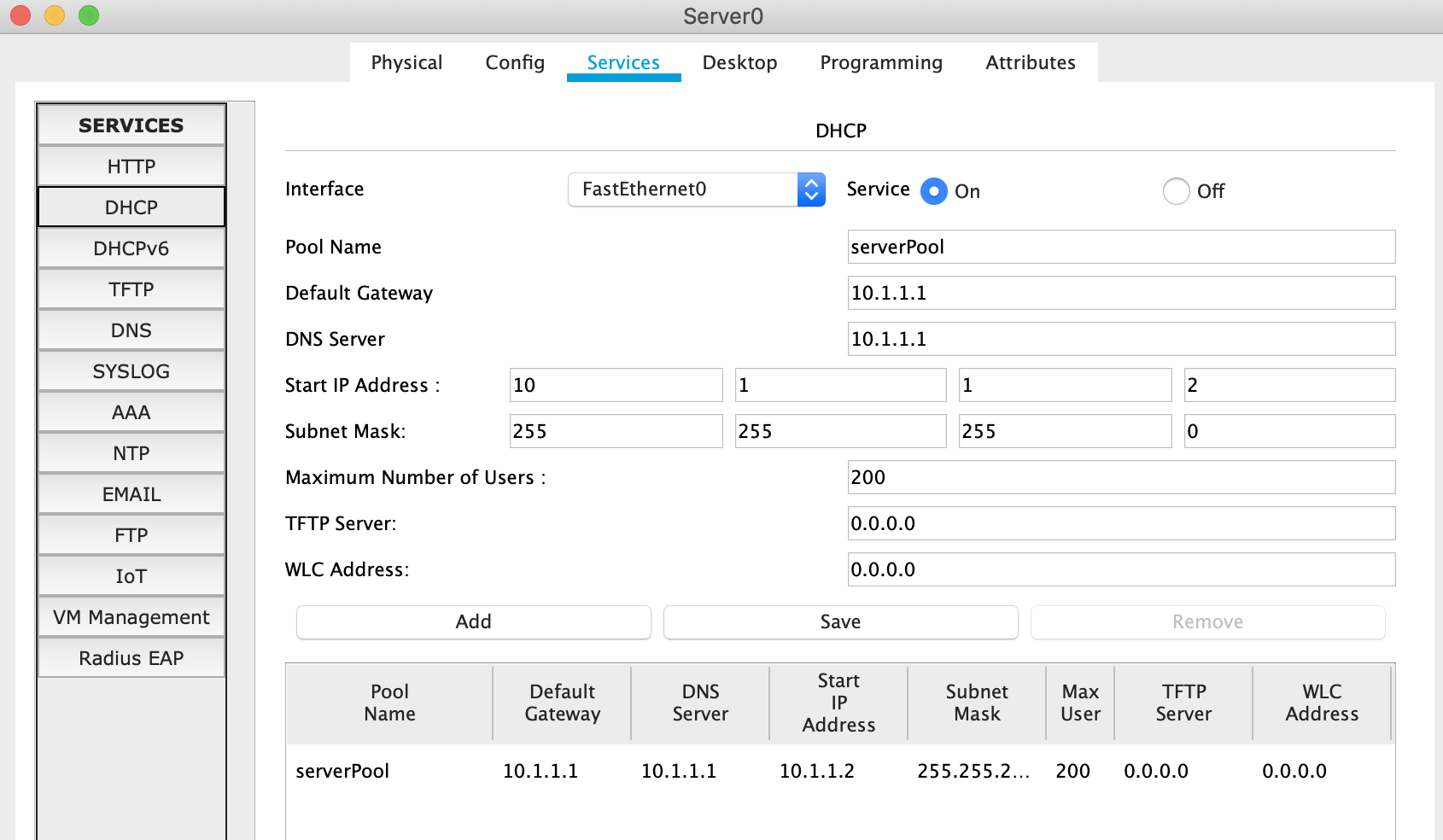
配置server的IP为10.1.1.1, DHCP如下:

image-20201123192721758

配置IOT

修改其他全部设备的IP为DHCP模式, 等待一会儿, 确认全部设备已获取到IP.

在server的service中打开IoT.

用手机打开IoT monitor. 输入server的IP, 注册账户.

在全部IoT设备中配置IoT server为10.1.1.1, 用户密码为上一步配置的.

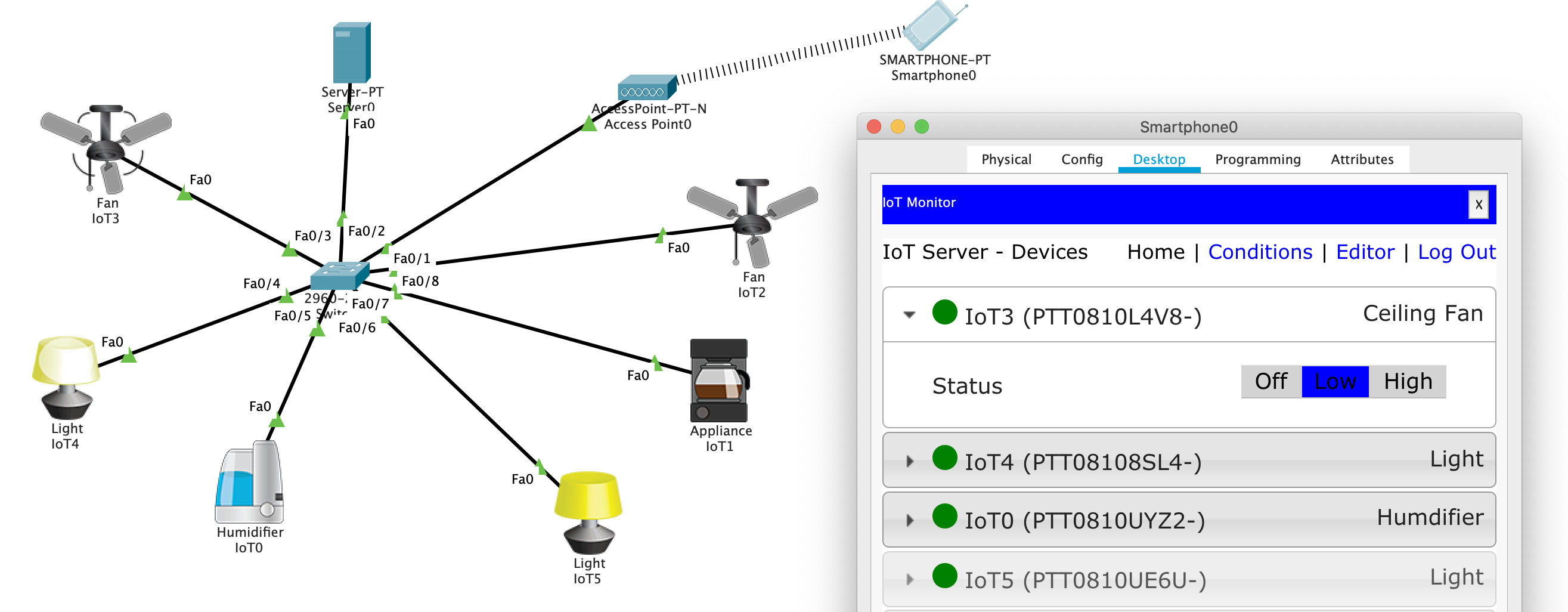
再回到手机界面查看IoT monitor:

image-20201123192621284

已经可以操控全部设备.

实验结束.

The Analysis of Effect of Currency Exposure on Revenue

Question 1

  • Frame the issue. Why is Brenzel Concerned by the current exchange rate fluctuation?

Because the company has a large amount of U.S. dollar accounts receivable, but the company’s basic currency is Canadian dollars. If in the future the Canadian dollar strengthens and the U.S. dollar falls, the company will bear the losses caused by this part of the exchange rate fluctuation.

Question 2

  • Which vehicles does Acpana have at its disposal for hedging? Assume Acpana will need to transfer $200,000 US dollars to Canadian dollars on a regular basis, calculate the impact of these different hedging strategies against a naked position at:

    1. 1 Cdn $ =1 US $;
    2. 1 Cdn $ = 0.90 US $;
    3. 1 Cdn $ = 1.10 US $.

Generally speaking, the tools for hedging can choose to buy Canadian dollar forward contracts or buy Canadian dollar options. The former can lock in the amount of Canadian dollars that will be exchanged for U.S. dollars in the future, and the latter can exercise the income in U.S. dollars after the Canadian dollar appreciates.

Although selling U.S. dollar options can make a profit when the Canadian dollar rises , there is a limit on the profit. Assuming that the same amount of options are sold, if the exchange rate exceeds ask, the rise cannot completely hedge against the Canadian dollar rise. In general, selling options is not a hedging to reduce risk, so in this case only data comparison is provided, not considered as a choice.

Different vehicles’ data refered from original paper.

forward contract quotations

Spot 0.9731

Period Ask
1 Month 0.97374
3 Month 0.97510
6 Month 0.97765
9 Month 0.98052
1 Year 0.98385

options quotations

Spot 0.9731

Call Option Put Option
MM/DD/YY Strike Ask MM/YY Strike Ask
04/01/11 0.97374 0.9334% 04/01/11 0.97374 0.9334%
06/02/11 0.97510 1.7150% 06/02/11 0.97510 1.7150%
09/05/11 0.97765 2.6023% 09/05/11 0.97765 2.6023%
12/02/11 0.98052 3.2584% 12/02/11 0.98052 3.2584%
03/02/12 0.98385 3.8363% 03/02/12 0.98385 3.8363%

Now we can compare the following three scenarios with the 200,000 U.S. dollar income receivable in Canadian dollars after one month of different exchange rates:

exchange rate after 1 month do nothing sell US dollar contract buy CAD call option sell CAD put option
1 Cdn $ =1 US $ 200,000 1947480.00 1981332.00 1965657.78
1 Cdn $ = 0.90 US $ 222,222.2 1947480.00 2201480.00 1965657.78
1 Cdn $ = 1.10 US 181,818.2 1947480.00 1929302.22 1835152.73

It can be seen that while the call option maintains the ability to resist risks, it also has a certain profit margin.

Question 3

  • Should Schenkel recommend Acpana hedge its position in Canadian dollars? Why or why not? If you think he should recommend a hedge, which vehicle should he recommend?

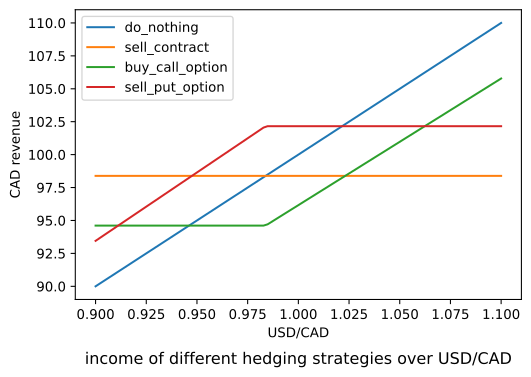
Let us first examine the yield curve of the above four processing methods from 0.9 to 1.1 on CND/USD. One-year futures and options expiring on 03/02/12 are used as the data benchmark.
output_3_1

It can be seen that in the next year, if the U.S. dollar rises sharply, it is optimal not to take any measures, and if the U.S. dollar plummets, it is optimal to sell forward dollar contracts.

However, it must be noted that no matter what kind of situation, the purchase option will not deviate too much from the optimal solution.

According to the forecast of the Economist Intelligence Unit given in the question in 2011, CAD/USD=0.98, that is, USD/CAD=1.0204, it can be seen that the sell put option is the optimal, and secondly, choosing to do nothing is the optimal solution.

But I think these two schemes are not hedging schemes.If the exchange rate drops to around 0.9, the loss will be larger, and as the exchange rate drops, the loss will change linearly.

Therefore, I would recommend the use of forward contracts, because this method is the most effective in combating risks.

Question 4

  • Does the Economist Business Unit’s forecast that the Canadian dollar will finish the year at parity to the US dollar affect your decision to hedge?

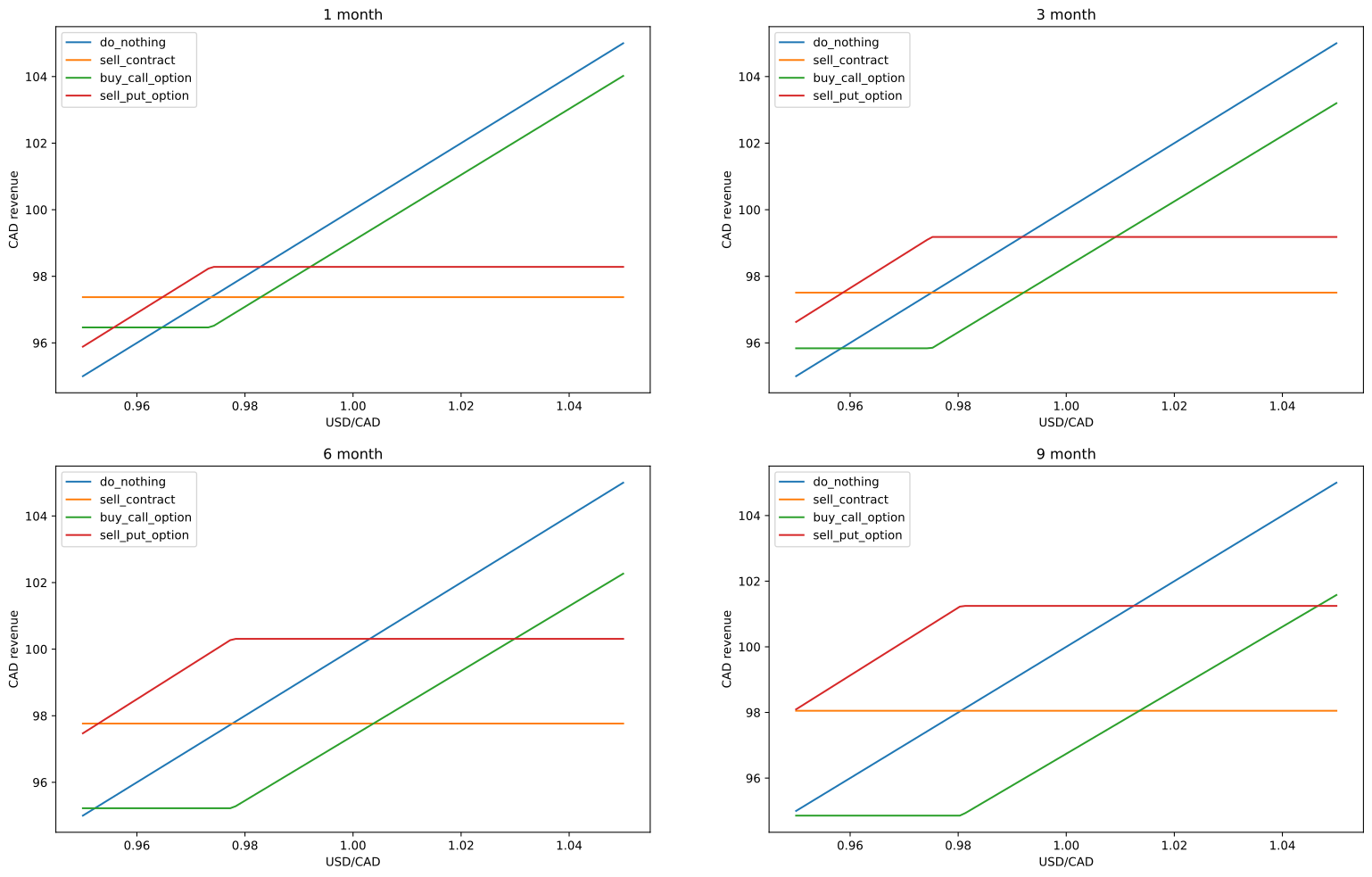
Investigate the income of different monthly hedging products in the form of images:
output_9_0

In the case of USD/CAD=1, in products less than 6 months old, options are better than contracts, but in most cases it is still optimal to do nothing. But this does not affect my opinion, I still It is recommended to use forward contracts.

Summarize

Although in most cases, especially when the U.S. dollar is bullish, doing nothing is optimal, but in order to combat unknown risks, it is best to buy a certain amount of forward contracts to reduce the overall risk.
实验内容

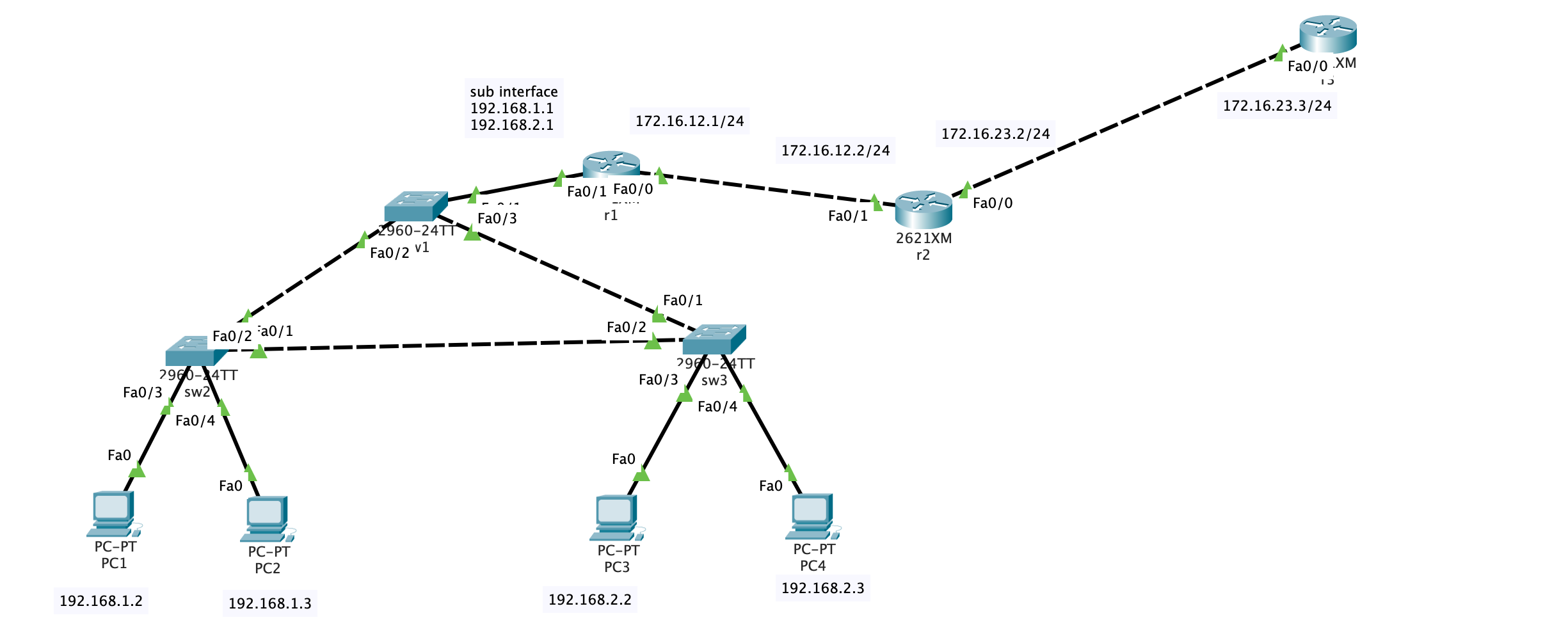
  1. 按照以下组网图把设备连接好(注意,R1的S1/0是DCE端,要在接口下用clock rate 64000来配置时钟频率);
  2. 按照拓扑图修改设备名,所有设备关闭域名解析,关闭自动退出。(考点-IOS基本操作)
  3. PC1和PC2属于192.168.1.0网段,这个部门有20人,PC3和PC4属于192.168.2.0网段,这个部门有40人。请选择正确的子网掩码,要求最少浪费IP地址(考点–子网划分)
  4. 三台交换之间封装trunk(考点–trunk)
  5. SW1,SW2,SW3属于同VTP域,域名ccna,其中SW1为server,SW2,SW3是客户端。SW1上建立VLAN10和VLAN20,SW2和SW3能够从SW1上学习到VLAN信息(考点–VTP)
  6. 将SW2上的F0/5和F0/6划进VLAN10,SW3上的F0/5和F0/6划进VLAN20.(考点–VLAN)
  7. 将SW2设为vlan10、vlan20的根桥。注意在两个vlan里都要设置(考点–STP)
  8. 在R1上配置单臂路由,注意SW1的F0/1封装trunk。(考点–单臂路由)
  9. R1是公司内部路由,R2是边界,R1、R2运行RIP版本2协议,使公司内全通。(考点–RIP)
  10. 在R2上配置VTY,密码111,特权密码222,允许别人telnet。配置标准的ACL,应用到VTY接口下,使得只有PC1能够telnet R2(考点–telnet,ACL)
  11. 在R2上配置NAT,使192.168.1.0和192.168.2.0这两段内网地址在访问外网时全部转换为R2的S1/1接口地址。在R2上指一条0.0.0.0的默认路由,出接口S1/1(考点–NAT,静态路由)

实验过程

image-20201123085107282

计算子网

考虑到”PC1和PC2属于192.168.1.0网段,这个部门有20人,PC3和PC4属于192.168.2.0网段,这个部门有40人。请选择正确的子网掩码,要求最少浪费IP地址”

1
2
20 = 0b10100
40 = 0b101000

因此子网掩码的位数分别为32-5 = 27位, 0b11100000 = 22432-6=26位, 0b11000000 = 192.

子网掩码可以分别设置为255.255.255.224255.255.255.192.

配置truck

接下来在交换机的端口配置trunk.
以sw1为例

1
2
Switch(config)#interface FastEthernet0/2
Switch(config-if)#switchport mode trunk

配置vtp

SW1,SW2,SW3属于同VTP域,域名ccna,其中SW1为server,SW2,SW3是客户端。SW1上建立VLAN10和VLAN20,SW2和SW3能够从SW1上学习到VLAN信息

在SW1上:

1
2
3
4
5
6
7
8
9
10
11
Switch#vlan database
Switch(vlan)#vtp server
Device mode already VTP SERVER.
Switch(vlan)#vtp domain ccna
Changing VTP domain name from NULL to ccna
Switch(vlan)#vlan 10 name VLAN10
VLAN 10 modified:
Name: VLAN10
Switch(vlan)#vlan 20 name VLAN20
VLAN 20 modified:
Name: VLAN20

在sw2和sw3上:

1
2
3
4
5
Switch#vlan database
Switch(vlan)#vtp client
Setting device to VTP CLIENT mode.
Switch(vlan)#vtp domain ccna
Domain name already set to ccna.

划分端口VLAN

将SW2上的F0/3和F0/4划进VLAN10,SW3上的F0/3和F0/4划进VLAN20

设置根桥

将SW2设为vlan10、vlan20的根桥。注意在两个vlan里都要设置

1
2
Switch(config)#spanning-tree vlan 10 root primary
Switch(config)#spanning-tree vlan 20 root primary

单臂路由

在R1上配置单臂路由,注意SW1的F0/1封装trunk

1
2
3
4
5
6
7
8
Router(config)#int f0/1.1
Router(config-subif)#encapsulation dot1Q 10
Router(config-subif)#ip address 192.168.1.1 255.255.255.0
Router(config-subif)#exit
Router(config)#int f0/1.2
Router(config-subif)#encapsulation dot1Q 20
Router(config-subif)#ip address 192.168.2.1 255.255.255.0
Router(config-subif)#exit

encapsulation dot1Q 10语句中最后的10是VLAN号, 不要弄错了

配置rip协议

R1是公司内部路由,R2是边界,R1、R2运行RIP版本2协议,使公司内全通

1
2
3
4
5
6
7
8
9
Router>en
Router#configure terminal
Enter configuration commands, one per line. End with CNTL/Z.
Router(config)#router rip
Router(config-router)#version 2
Router(config-router)#network 192.168.2.0
Router(config-router)#network 192.168.1.0
Router(config-router)#network 172.16.12.0
Router(config-router)#end

在PC1上测试:

1
2
3
4
5
6
7
8
9
10
11
12
13
C:\>ping 172.16.12.2

Pinging 172.16.12.2 with 32 bytes of data:

Reply from 172.16.12.2: bytes=32 time=8ms TTL=254
Reply from 172.16.12.2: bytes=32 time=17ms TTL=254
Reply from 172.16.12.2: bytes=32 time=2ms TTL=254
Reply from 172.16.12.2: bytes=32 time<1ms TTL=254

Ping statistics for 172.16.12.2:
Packets: Sent = 4, Received = 4, Lost = 0 (0% loss),
Approximate round trip times in milli-seconds:
Minimum = 0ms, Maximum = 17ms, Average = 6ms

配置Telnet和ACL

在R2上配置VTY,密码111,特权密码222,允许别人telnet。配置标准的ACL,应用到VTY接口下,使得只有PC1能够telnet R2

先配置R2上的登陆环境:

1
2
3
4
Router(config)#enable secret 222
Router(config)#line vty 0 4
Router(config-line)#password 111
Router(config-line)#login

配置完毕后在R1上测试:

1
2
3
4
5
6
7
8
9
10
11
12
Router#telnet 172.16.12.2
Trying 172.16.12.2 ...Open


User Access Verification

Password:
Router>en
Password:
Router#exit

[Connection to 172.16.12.2 closed by foreign host]

再配置ACL:

在R2上:

1
2
3
4
5
Router(config)#access-list 101 permit tcp host 192.168.1.2 host 172.16.12.2 eq telnet
Router(config)#access-list 101 deny tcp any host 172.16.12.2 eq telnet
Router(config)#access-list 101 permit ip any any
Router(config)#int fa 0/1
Router(config-if)#ip access-group 101 in

配置完成后测试:

在R1上:

1
2
3
Router#telnet 172.16.12.2
Trying 172.16.12.2 ...
% Connection timed out; remote host not responding

在PC1上:

1
2
3
4
5
6
7
8
9
10
C:\>telnet 172.16.12.2
Trying 172.16.12.2 ...Open


User Access Verification

Password:
Router>en
Password:
Router#

符合预期

配置NAT

在R2上配置NAT,使192.168.1.0和192.168.2.0这两段内网地址在访问外网时全部转换为R2的Fa0/0接口地址。在R2上指一条0.0.0.0的默认路由,出接口Fa0/0

1
2
3
4
5
6
7
8
9
Router(config)#interface fa0/0
Router(config-if)#ip nat outside
Router(config-if)#int fa0/1
Router(config-if)#ip nat inside
Router(config-if)#exit
Router(config)#access-list 10 permit 192.168.1.0 0.0.0.255
Router(config)#access-list 10 permit 192.168.2.0 0.0.0.255
Router(config)#ip nat pool ippool 176.16.23.4 176.16.23.255 netmask 255.255.255.0
Router(config)#ip nat inside source list 10 pool ippool

添加静态路由

在R3上:

1
Router(config)#ip route 0.0.0.0 0.0.0.0 172.16.23.2

测试:

在PC1上ping r3, 然后查看R2的nat translation:

1
2
3
4
5
6
7
8
9
10
11
12
13
C:\>ping 172.16.23.3

Pinging 172.16.23.3 with 32 bytes of data:

Reply from 172.16.23.3: bytes=32 time=1ms TTL=253
Reply from 172.16.23.3: bytes=32 time<1ms TTL=253
Reply from 172.16.23.3: bytes=32 time=1ms TTL=253
Reply from 172.16.23.3: bytes=32 time<1ms TTL=253

Ping statistics for 172.16.23.3:
Packets: Sent = 4, Received = 4, Lost = 0 (0% loss),
Approximate round trip times in milli-seconds:
Minimum = 0ms, Maximum = 1ms, Average = 0ms
1
2
3
4
5
6
Router#show ip nat translations 
Pro Inside global Inside local Outside local Outside global
icmp 176.16.23.5:89 192.168.1.2:89 172.16.23.3:89 172.16.23.3:89
icmp 176.16.23.5:90 192.168.1.2:90 172.16.23.3:90 172.16.23.3:90
icmp 176.16.23.5:91 192.168.1.2:91 172.16.23.3:91 172.16.23.3:91
icmp 176.16.23.5:92 192.168.1.2:92 172.16.23.3:92 172.16.23.3:92

实验要求

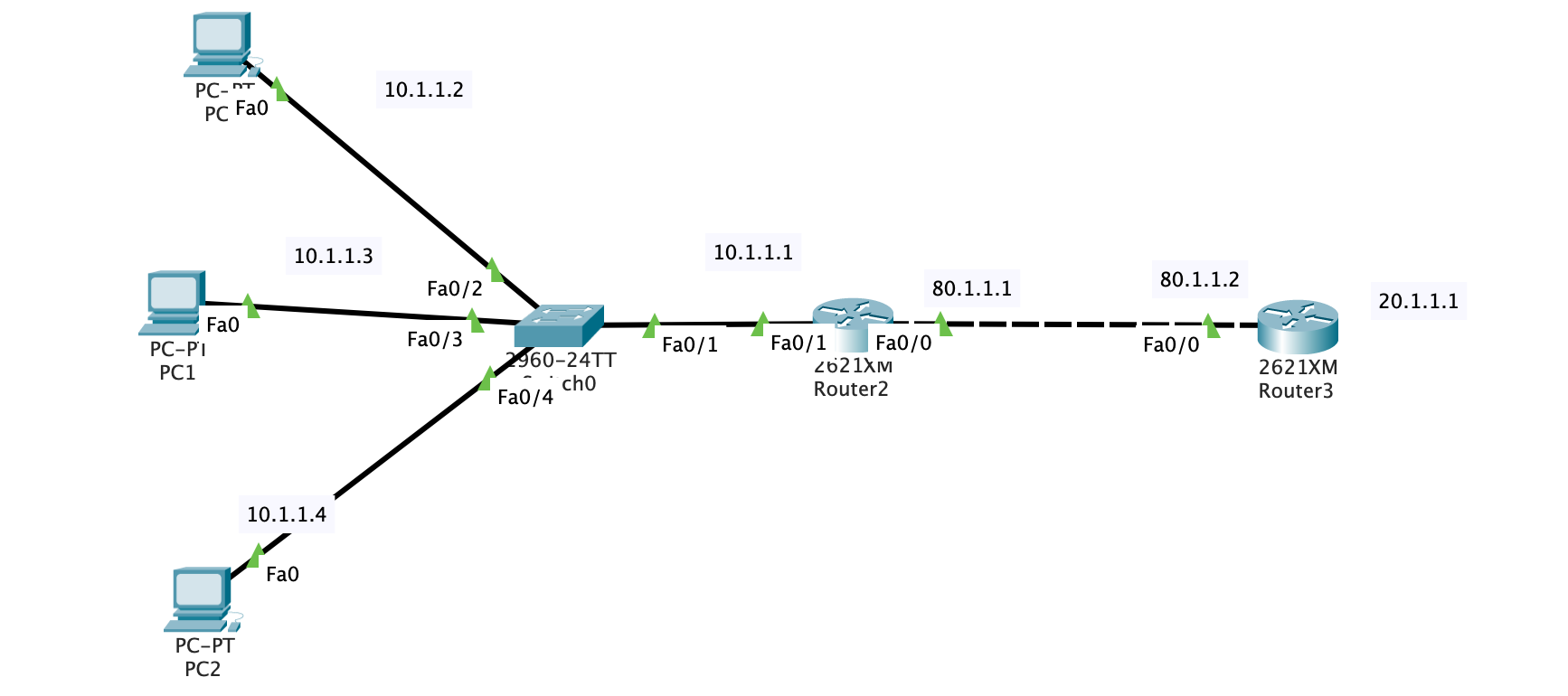
1.将 10.1.1.2 和 10.1.1.3 做动态 NAT 转换,地址池范围为:80.1.1.2-80.1.1.9;
2.将 10.1.1.4 静态转换成 80.1.1.10;
3.将路由器R1的以太网口 F0/0 地址做 PAT 转换。

实验过程

image-20201117171118610

如图配置网络拓扑, 配置好对应的rip协议, 使得PC0和r2能ping通.

r2 上的route

1
2
3
4
5
6
7
8
9
10
11
12
13
14
Router#show ip route 
Codes: C - connected, S - static, I - IGRP, R - RIP, M - mobile, B - BGP
D - EIGRP, EX - EIGRP external, O - OSPF, IA - OSPF inter area
N1 - OSPF NSSA external type 1, N2 - OSPF NSSA external type 2
E1 - OSPF external type 1, E2 - OSPF external type 2, E - EGP
i - IS-IS, L1 - IS-IS level-1, L2 - IS-IS level-2, ia - IS-IS inter area
* - candidate default, U - per-user static route, o - ODR
P - periodic downloaded static route

Gateway of last resort is not set

C 10.0.0.0/8 is directly connected, FastEthernet0/1
R 20.0.0.0/8 [120/1] via 80.1.1.2, 00:00:14, FastEthernet0/0
C 80.0.0.0/8 is directly connected, FastEthernet0/0

r3上的route:

1
2
3
4
5
6
7
8
9
10
11
12
13
14
15
Router>show ip route
Codes: C - connected, S - static, I - IGRP, R - RIP, M - mobile, B - BGP
D - EIGRP, EX - EIGRP external, O - OSPF, IA - OSPF inter area
N1 - OSPF NSSA external type 1, N2 - OSPF NSSA external type 2
E1 - OSPF external type 1, E2 - OSPF external type 2, E - EGP
i - IS-IS, L1 - IS-IS level-1, L2 - IS-IS level-2, ia - IS-IS inter area
* - candidate default, U - per-user static route, o - ODR
P - periodic downloaded static route

Gateway of last resort is not set

R 10.0.0.0/8 [120/1] via 80.1.1.1, 00:00:22, FastEthernet0/0
20.0.0.0/24 is subnetted, 1 subnets
C 20.1.1.0 is directly connected, Loopback0
C 80.0.0.0/8 is directly connected, FastEthernet0/0

配置nat

1
2
3
4
5
6
7
8
9
10
11
12
Router(config)#interface FastEthernet0/0
Router(config-if)#ip nat outside
Router(config-if)#int fa0/1
Router(config-if)#ip nat inside
Router(config-if)#exit
Router(config)#ip nat inside source static 10.1.1.4 80.1.1.10
Router(config)#access-list 10 permit host 10.1.1.2
Router(config)#access-list 10 permit host 10.1.1.3
Router(config)#ip nat pool ippool 80.1.1.2 80.1.1.9 netmask 255.255.255.240
Router(config)#ip nat inside source list 10 pool ippool
Router(config)#access-list 11 permit host 10.1.1.1
Router(config)#ip nat inside source list 11 interface fa0/1 overload

测试

在r2上开启nat debug:

1
2
Router#debug ip nat
IP NAT debugging is on

在pc2上ping 20.1.1.1, 在r2的CLI中可以看到debug信息:

1
2
3
4
5
6
7
8
9
10
11
12
13
14
15
16
17
18
19
20
21
22
23
24
Router#
NAT: s=10.1.1.4->80.1.1.10, d=20.1.1.1 [126]

NAT*: s=20.1.1.1, d=80.1.1.10->10.1.1.4 [1411]

NAT: s=10.1.1.4->80.1.1.10, d=20.1.1.1 [127]

NAT*: s=20.1.1.1, d=80.1.1.10->10.1.1.4 [1412]

NAT: s=10.1.1.4->80.1.1.10, d=20.1.1.1 [128]

NAT*: s=20.1.1.1, d=80.1.1.10->10.1.1.4 [1413]

NAT: s=10.1.1.4->80.1.1.10, d=20.1.1.1 [129]

NAT*: s=20.1.1.1, d=80.1.1.10->10.1.1.4 [1414]

NAT: expiring 80.1.1.10 (10.1.1.4) icmp 126 (126)

NAT: expiring 80.1.1.10 (10.1.1.4) icmp 127 (127)

NAT: expiring 80.1.1.10 (10.1.1.4) icmp 128 (128)

NAT: expiring 80.1.1.10 (10.1.1.4) icmp 129 (129)

分别在pc0, pc1, pc2上执行ping 20.1.1.1 -n 1000, 在NAT路由器r2上查看nat状态

1
2
3
4
5
6
7
8
9
10
11
12
13
14
15
16
17
18
19
20
21
22
23
24
25
26
27
28
29
30
31
32
33
34
35
36
37
38
39
40
41
42
43
44
45
46
47
48
49
50
51
52
53
54
55
56
57
58
59
60
61
62
63
64
65
66
67
68
69
Router#show ip nat translations 
Pro Inside global Inside local Outside local Outside global
icmp 80.1.1.10:26 10.1.1.4:26 20.1.1.1:26 20.1.1.1:26
icmp 80.1.1.10:27 10.1.1.4:27 20.1.1.1:27 20.1.1.1:27
icmp 80.1.1.10:28 10.1.1.4:28 20.1.1.1:28 20.1.1.1:28
icmp 80.1.1.10:29 10.1.1.4:29 20.1.1.1:29 20.1.1.1:29
icmp 80.1.1.10:30 10.1.1.4:30 20.1.1.1:30 20.1.1.1:30
icmp 80.1.1.10:31 10.1.1.4:31 20.1.1.1:31 20.1.1.1:31
icmp 80.1.1.10:32 10.1.1.4:32 20.1.1.1:32 20.1.1.1:32
icmp 80.1.1.10:33 10.1.1.4:33 20.1.1.1:33 20.1.1.1:33
icmp 80.1.1.10:34 10.1.1.4:34 20.1.1.1:34 20.1.1.1:34
icmp 80.1.1.10:35 10.1.1.4:35 20.1.1.1:35 20.1.1.1:35
icmp 80.1.1.10:36 10.1.1.4:36 20.1.1.1:36 20.1.1.1:36
icmp 80.1.1.10:37 10.1.1.4:37 20.1.1.1:37 20.1.1.1:37
icmp 80.1.1.10:38 10.1.1.4:38 20.1.1.1:38 20.1.1.1:38
icmp 80.1.1.10:39 10.1.1.4:39 20.1.1.1:39 20.1.1.1:39
icmp 80.1.1.10:40 10.1.1.4:40 20.1.1.1:40 20.1.1.1:40
icmp 80.1.1.10:41 10.1.1.4:41 20.1.1.1:41 20.1.1.1:41
icmp 80.1.1.10:42 10.1.1.4:42 20.1.1.1:42 20.1.1.1:42
icmp 80.1.1.10:43 10.1.1.4:43 20.1.1.1:43 20.1.1.1:43
icmp 80.1.1.10:44 10.1.1.4:44 20.1.1.1:44 20.1.1.1:44
icmp 80.1.1.10:45 10.1.1.4:45 20.1.1.1:45 20.1.1.1:45
icmp 80.1.1.10:46 10.1.1.4:46 20.1.1.1:46 20.1.1.1:46
icmp 80.1.1.10:47 10.1.1.4:47 20.1.1.1:47 20.1.1.1:47
icmp 80.1.1.10:48 10.1.1.4:48 20.1.1.1:48 20.1.1.1:48
icmp 80.1.1.10:49 10.1.1.4:49 20.1.1.1:49 20.1.1.1:49
icmp 80.1.1.10:50 10.1.1.4:50 20.1.1.1:50 20.1.1.1:50
icmp 80.1.1.10:51 10.1.1.4:51 20.1.1.1:51 20.1.1.1:51
icmp 80.1.1.10:52 10.1.1.4:52 20.1.1.1:52 20.1.1.1:52
icmp 80.1.1.10:53 10.1.1.4:53 20.1.1.1:53 20.1.1.1:53
icmp 80.1.1.10:54 10.1.1.4:54 20.1.1.1:54 20.1.1.1:54
icmp 80.1.1.10:55 10.1.1.4:55 20.1.1.1:55 20.1.1.1:55
icmp 80.1.1.10:56 10.1.1.4:56 20.1.1.1:56 20.1.1.1:56
icmp 80.1.1.10:57 10.1.1.4:57 20.1.1.1:57 20.1.1.1:57
icmp 80.1.1.10:58 10.1.1.4:58 20.1.1.1:58 20.1.1.1:58
icmp 80.1.1.10:59 10.1.1.4:59 20.1.1.1:59 20.1.1.1:59
icmp 80.1.1.5:13 10.1.1.3:13 20.1.1.1:13 20.1.1.1:13
icmp 80.1.1.5:14 10.1.1.3:14 20.1.1.1:14 20.1.1.1:14
icmp 80.1.1.5:15 10.1.1.3:15 20.1.1.1:15 20.1.1.1:15
icmp 80.1.1.5:16 10.1.1.3:16 20.1.1.1:16 20.1.1.1:16
icmp 80.1.1.5:17 10.1.1.3:17 20.1.1.1:17 20.1.1.1:17
icmp 80.1.1.5:18 10.1.1.3:18 20.1.1.1:18 20.1.1.1:18
icmp 80.1.1.5:19 10.1.1.3:19 20.1.1.1:19 20.1.1.1:19
icmp 80.1.1.5:20 10.1.1.3:20 20.1.1.1:20 20.1.1.1:20
icmp 80.1.1.5:21 10.1.1.3:21 20.1.1.1:21 20.1.1.1:21
icmp 80.1.1.5:22 10.1.1.3:22 20.1.1.1:22 20.1.1.1:22
icmp 80.1.1.5:23 10.1.1.3:23 20.1.1.1:23 20.1.1.1:23
icmp 80.1.1.5:24 10.1.1.3:24 20.1.1.1:24 20.1.1.1:24
icmp 80.1.1.5:25 10.1.1.3:25 20.1.1.1:25 20.1.1.1:25
icmp 80.1.1.5:26 10.1.1.3:26 20.1.1.1:26 20.1.1.1:26
icmp 80.1.1.5:27 10.1.1.3:27 20.1.1.1:27 20.1.1.1:27
icmp 80.1.1.5:28 10.1.1.3:28 20.1.1.1:28 20.1.1.1:28
icmp 80.1.1.5:29 10.1.1.3:29 20.1.1.1:29 20.1.1.1:29
icmp 80.1.1.5:30 10.1.1.3:30 20.1.1.1:30 20.1.1.1:30
icmp 80.1.1.5:31 10.1.1.3:31 20.1.1.1:31 20.1.1.1:31
icmp 80.1.1.5:32 10.1.1.3:32 20.1.1.1:32 20.1.1.1:32
icmp 80.1.1.5:33 10.1.1.3:33 20.1.1.1:33 20.1.1.1:33
icmp 80.1.1.5:34 10.1.1.3:34 20.1.1.1:34 20.1.1.1:34
icmp 80.1.1.5:35 10.1.1.3:35 20.1.1.1:35 20.1.1.1:35
icmp 80.1.1.6:32 10.1.1.2:32 20.1.1.1:32 20.1.1.1:32
icmp 80.1.1.6:33 10.1.1.2:33 20.1.1.1:33 20.1.1.1:33
icmp 80.1.1.6:34 10.1.1.2:34 20.1.1.1:34 20.1.1.1:34
icmp 80.1.1.6:35 10.1.1.2:35 20.1.1.1:35 20.1.1.1:35
icmp 80.1.1.6:36 10.1.1.2:36 20.1.1.1:36 20.1.1.1:36
icmp 80.1.1.6:37 10.1.1.2:37 20.1.1.1:37 20.1.1.1:37
icmp 80.1.1.6:38 10.1.1.2:38 20.1.1.1:38 20.1.1.1:38
icmp 80.1.1.6:39 10.1.1.2:39 20.1.1.1:39 20.1.1.1:39
icmp 80.1.1.6:40 10.1.1.2:40 20.1.1.1:40 20.1.1.1:40
--- 80.1.1.10 10.1.1.4 --- ---

注意到10.1.1.4优先使用了动态nat池.

停止全部的ping, 再次查看nat:

1
2
3
Router#show ip nat translations 
Pro Inside global Inside local Outside local Outside global
--- 80.1.1.10 10.1.1.4 --- ---

可见动态的nat已经全部停止, 只剩下静态nat

1
2
3
4
5
6
7
8
9
10
11
12
Router#show ip nat statistics 
Total translations: 31 (1 static, 30 dynamic, 30 extended)
Outside Interfaces: FastEthernet0/0
Inside Interfaces: FastEthernet0/1
Hits: 1231 Misses: 1383
Expired translations: 1215
Dynamic mappings:
-- Inside Source
access-list 10 pool ippool refCount 30
pool ippool: netmask 255.255.255.240
start 80.1.1.2 end 80.1.1.9
type generic, total addresses 8 , allocated 0 (0%), misses 0

小结

动态和静态NAT的优先度规则还不清楚, 配置的PAT似乎也没有使用到.

实验记录

网络初始构造

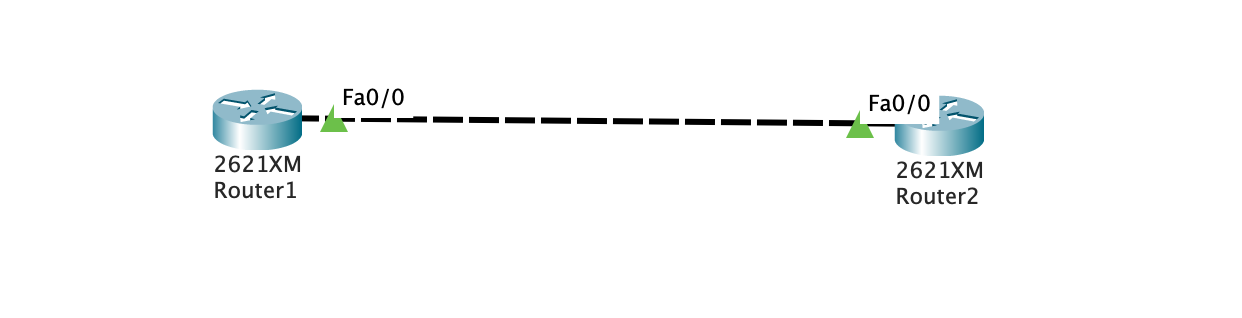
拖出两个路由器并连接

image-20201118233430497

路由器初始配置

r1

1
2
3
4
5
6
7
8
9
10
Router>enable
Router#
Router#configure terminal
Enter configuration commands, one per line. End with CNTL/Z.
Router(config)#interface FastEthernet0/0
Router(config-if)#ip address 10.0.0.1 255.0.0.0
Router(config-if)#
Router(config-if)#exit
Router(config)#interface FastEthernet0/0
Router(config-if)#no shutdown

r2

1
2
3
4
5
6
7
8
9
10
Router>enable
Router#
Router#configure terminal
Enter configuration commands, one per line. End with CNTL/Z.
Router(config)#interface FastEthernet0/0
Router(config-if)#ip address 10.0.0.2 255.0.0.0
Router(config-if)#
Router(config-if)#exit
Router(config)#interface FastEthernet0/0
Router(config-if)#no shutdown

测试连通性

r1 ping r2

1
2
3
4
5
6
Router#ping 10.0.0.2

Type escape sequence to abort.
Sending 5, 100-byte ICMP Echos to 10.0.0.2, timeout is 2 seconds:
!!!!!
Success rate is 100 percent (5/5), round-trip min/avg/max = 0/3/19 ms

r2 ping r1

1
2
3
4
5
6
Router#ping 10.0.0.1

Type escape sequence to abort.
Sending 5, 100-byte ICMP Echos to 10.0.0.1, timeout is 2 seconds:
!!!!!
Success rate is 100 percent (5/5), round-trip min/avg/max = 0/0/0 ms

创建和部署 ACL,并验证实验效果

在r1上:

1
2
3
Router(config)access-list 100 deny icmp 10.0.0.1 0.0.0.0 10.0.0.2 0.0.0.0
Router(config)#interface f0/0
Router(config-if)#ip access-group 100 out

部署完成后依旧可以正常ping

在r2上:

1
2
3
Router(config)access-list 100 deny icmp 10.0.0.1 0.0.0.0 10.0.0.2 0.0.0.0
Router(config)#interface f0/0
Router(config-if)#ip access-group 100 in

部署完成后从PC1 ping PC2:

1
2
3
4
5
6
Router#ping 10.0.0.2

Type escape sequence to abort.
Sending 5, 100-byte ICMP Echos to 10.0.0.2, timeout is 2 seconds:
.....
Success rate is 0 percent (0/5)

从PC2 ping PC1:

1
2
3
4
5
6
Router#ping 10.0.0.1

Type escape sequence to abort.
Sending 5, 100-byte ICMP Echos to 10.0.0.1, timeout is 2 seconds:
UUUUU
Success rate is 0 percent (0/5)

均不能成功

观察packet tracer的模拟发现

在pc1 ping pc2的过程中ICMP包顺利到达pc2, pc2发了回应包, 但是pc1拒绝了这些包. 因此PC1上的ping进程会一直等待到timeout.

在pc2 ping pc1的过程中, pc1立刻返回了一个error(meassage type 3), PC2会立刻记录一个U, 并没有等待的过程.

telnet实验

清除原有的access list

1
2
3
4
5
6
7
8
9
10
Router#show ip access-lists
Extended IP access list 100
10 deny icmp host 10.0.0.1 host 10.0.0.2

Router#conf t
Enter configuration commands, one per line. End with CNTL/Z.
Router(config)#no ip access-list extended 100

Router#show ip access-lists
Router#

然后导出running-config, 重启路由器, 导入.
因为不知道为什么, 直接no掉access-list和access-group均不能恢复访问.

配置针对Telnet的ACL

先配置R2上的登陆环境:

1
2
3
4
Router(config)#enable secret network
Router(config)#line vty 0 4
Router(config-line)#password cisco
Router(config-line)#login

四行的作用分别是, 配置本地特权密码为network, 开启一个允许远程登录的线路, 容量为5(0-4), 设置line的登录密码为cisco, 允许远程登录.

在R1上测试登录R2:

第一次输入cisco, 第二次输入network.

1
2
3
4
5
6
7
8
9
10
Router#telnet 10.0.0.2
Trying 10.0.0.2 ...Open


User Access Verification

Password:
Router>en
Password:
Router#

配置ACL

在R2上:

1
2
3
4
Router(config)#access-list 101 deny tcp host 10.0.0.1 10.0.0.2 0.0.0.0 eq telnet
Router(config)#access-list 101 permit ip any any
Router(config)#int fa 0/0
Router(config-if)#ip access-group 101 in

注意 access-list的语法为:

1
2
3
4
access-list access-list-number [dynamic dynamic-name [timeout minutes]]
{deny | permit} tcp source source-wildcard [operator [port]] destination destination-wildcard [operator [port]]
[established] [precedence precedence] [tos tos] [log | log-input]
[time-range time-range-name][fragments]

针对上面的语句, host 10.0.0.1表示从10.0.0.1来的数据包, 10.0.0.2 0.0.0.0表示到10.0.0.2的数据包, 其中0.0.0.0是wildcard, 这条语句其实等同于host 10.0.0.2, eq telnet部分表示端口, eq后面的telnet的alias, 等同于eq 23.

验证ACL效果

1
2
3
Router>telnet 10.0.0.2
Trying 10.0.0.2 ...
% Connection timed out; remote host not responding

Telnet确实非常成功的阻断了

1
2
3
4
5
6
Router>ping 10.0.0.2

Type escape sequence to abort.
Sending 5, 100-byte ICMP Echos to 10.0.0.2, timeout is 2 seconds:
!!!!!
Success rate is 100 percent (5/5), round-trip min/avg/max = 0/3/19 ms

而ICMP可以通行.

注意, access-list中必须添加access-list 101 permit ip any any.

否则, ping命令也被阻断了, type 3, code 0x0d.

小结

为什么no掉access list无法恢复规则?

为什么必须添加access-list 101 permit ip any any?, access list的默认规则必须手动输入吗?

实验记录

网络初始构造

网络构造如图所示:

PC1,2,4属于VLAN2, 其他的属于VLAN3, 其中PCn的ip为192.168.{vlan}.n0.

例如, pc1属于vlan2, ip为192.168.2.10.

配置交换机

1
2
3
4
5
6
7
8
9
10
11
12
13
14
15
16
17
18
19
20
21
22
23
24
25
26
27
28
Switch(config)#interface FastEthernet0/1
Switch(config-if)#switchport access vlan 2
Switch(config-if)#exit
Switch(config)#interface FastEthernet0/2
Switch(config-if)#switchport access vlan 2
Switch(config-if)#exit
Switch(config)#interface FastEthernet0/3
Switch(config-if)#switchport access vlan 3
Switch(config-if)#exit
Switch(config)#interface FastEthernet0/4
Switch(config-if)#switchport access vlan 2
Switch(config-if)#exit
Switch(config)#interface FastEthernet0/5
Switch(config-if)#switchport access vlan 3
Switch(config-if)#exit
Switch(config)#interface FastEthernet0/6
Switch(config-if)#switchport access vlan 3
Switch(config-if)#exit
Switch(config)#interface FastEthernet0/7
Switch(config-if)#switchport access vlan 3
Switch(config-if)#exit
Switch(config)#interface FastEthernet0/8
Switch(config-if)#switchport access vlan 3
Switch(config-if)#exit

Switch(config)#interface GigabitEthernet0/1
Switch(config-if)#
Switch(config-if)#switchport mode trunk

查看VLAN

1
2
3
4
5
6
7
8
9
10
11
12
13
14
15
16
Switch#show vlan brief

VLAN Name Status Ports
---- -------------------------------- --------- -------------------------------
1 default active Fa0/9, Fa0/10, Fa0/11, Fa0/12
Fa0/13, Fa0/14, Fa0/15, Fa0/16
Fa0/17, Fa0/18, Fa0/19, Fa0/20
Fa0/21, Fa0/22, Fa0/23, Fa0/24
Gig0/2
2 VLAN2 active Fa0/1, Fa0/2, Fa0/4
3 VLAN3 active Fa0/3, Fa0/5, Fa0/6, Fa0/7
Fa0/8
1002 fddi-default active
1003 token-ring-default active
1004 fddinet-default active
1005 trnet-default active

配置单臂路由

1
2
3
4
5
6
7
8
9
10
11
12
13
14
15
16
17
18
19
Router(config)#int fastEthernet 0/0.1 
Router(config-subif)#
%LINK-5-CHANGED: Interface FastEthernet0/0.1, changed state to up

%LINEPROTO-5-UPDOWN: Line protocol on Interface FastEthernet0/0.1, changed state to up

Router(config-subif)#encapsulation dot1Q 2
Router(config-subif)#ip address 192.168.2.1 255.255.255.0
Router(config-subif)#exit

Router(config)#int fastEthernet 0/0.2
Router(config-subif)#
%LINK-5-CHANGED: Interface FastEthernet0/0.2, changed state to up

%LINEPROTO-5-UPDOWN: Line protocol on Interface FastEthernet0/0.2, changed state to up

Router(config-subif)#encapsulation dot1Q 3
Router(config-subif)#ip address 192.168.3.1 255.255.255.0
Router(config-subif)#exit

测试

pc1 ping pc5

1
2
3
4
5
6
7
8
9
10
11
12
13
C:\>ping 192.168.3.50

Pinging 192.168.3.50 with 32 bytes of data:

Reply from 192.168.3.50: bytes=32 time=2ms TTL=127
Reply from 192.168.3.50: bytes=32 time=1ms TTL=127
Reply from 192.168.3.50: bytes=32 time<1ms TTL=127
Reply from 192.168.3.50: bytes=32 time=38ms TTL=127

Ping statistics for 192.168.3.50:
Packets: Sent = 4, Received = 4, Lost = 0 (0% loss),
Approximate round trip times in milli-seconds:
Minimum = 0ms, Maximum = 38ms, Average = 10ms

小结

注意配置sub interface时, 必须手动开启802.1Q协议

实验记录

网络初始构造

网络初始构造类似上文Enhanced Interior Gateway Routing Protocol, 新增一个交换机

image-20201119131535741

配置ospf

r0:

1
2
3
4
router ospf 100 
network 192.168.1.0 255.255.255.0 area 0
network 192.168.3.0 255.255.255.0 area 0
end

r1:

1
2
3
4
router ospf 100 
network 192.168.4.0 255.255.255.0 area 0
network 192.168.3.0 255.255.255.0 area 0
end

r2:

1
2
3
4
router ospf 100 
network 192.168.2.0 255.255.255.0 area 0
network 192.168.4.0 255.255.255.0 area 0
end

检查路由器状态

r0

1
2
3
4
5
6
7
8
9
10
11
12
13
14
15
Router#show ip route
Codes: C - connected, S - static, I - IGRP, R - RIP, M - mobile, B - BGP
D - EIGRP, EX - EIGRP external, O - OSPF, IA - OSPF inter area
N1 - OSPF NSSA external type 1, N2 - OSPF NSSA external type 2
E1 - OSPF external type 1, E2 - OSPF external type 2, E - EGP
i - IS-IS, L1 - IS-IS level-1, L2 - IS-IS level-2, ia - IS-IS inter area
* - candidate default, U - per-user static route, o - ODR
P - periodic downloaded static route

Gateway of last resort is not set

C 192.168.1.0/24 is directly connected, FastEthernet0/0
O 192.168.2.0/24 [110/66] via 192.168.3.2, 00:02:05, Serial2/0
C 192.168.3.0/24 is directly connected, Serial2/0
O 192.168.4.0/24 [110/65] via 192.168.3.2, 00:02:05, Serial2/0

测试ping

pc0 ping pc1

1
2
3
4
5
6
7
8
9
10
11
12
13
C:\>ping 192.168.2.2

Pinging 192.168.2.2 with 32 bytes of data:

Reply from 192.168.2.2: bytes=32 time=23ms TTL=125
Reply from 192.168.2.2: bytes=32 time=1ms TTL=125
Reply from 192.168.2.2: bytes=32 time=2ms TTL=125

Ping statistics for 192.168.2.2:
Packets: Sent = 4, Received = 4, Lost = 0 (0% loss),
Approximate round trip times in milli-seconds:
Minimum = 1ms, Maximum = 23ms, Average = 6ms

pc1 ping pc0

1
2
3
4
5
6
7
8
9
10
11
12
13
C:\>ping 192.168.1.2

Pinging 192.168.1.2 with 32 bytes of data:

Reply from 192.168.1.2: bytes=32 time=2ms TTL=125
Reply from 192.168.1.2: bytes=32 time=1ms TTL=125

Ping statistics for 192.168.1.2:
Packets: Sent = 4, Received = 4, Lost = 0 (0% loss),
Approximate round trip times in milli-seconds:
Minimum = 1ms, Maximum = 2ms, Average = 1ms

实验记录

网络初始构造

网络初始构造类似上文静态路由, 新增一个路由器

初始化

使用ripv2协议完成配置, 方法同rip实验, 测试pc0到pc1的通信:

1
2
3
4
5
6
7
8
9
10
11
12
13
C:\>ping 192.168.2.2

Pinging 192.168.2.2 with 32 bytes of data:

Reply from 192.168.2.2: bytes=32 time=22ms TTL=125
Reply from 192.168.2.2: bytes=32 time=23ms TTL=125
Reply from 192.168.2.2: bytes=32 time=1ms TTL=125
Reply from 192.168.2.2: bytes=32 time=23ms TTL=125

Ping statistics for 192.168.2.2:
Packets: Sent = 4, Received = 4, Lost = 0 (0% loss),
Approximate round trip times in milli-seconds:
Minimum = 1ms, Maximum = 23ms, Average = 17ms

正常

配置eigrp

以配置r3为例

1
2
3
4
5
6
7
8
9
10
Router>enable
Router#
Router#configure terminal
Enter configuration commands, one per line. End with CNTL/Z.
Router(config)#router eigrp 100
Router(config-router)#network 192.168.4.0 255.255.255.0
Router(config-router)#
%DUAL-5-NBRCHANGE: IP-EIGRP 100: Neighbor 192.168.4.1 (GigabitEthernet0/0) is up: new adjacency

Router(config-router)#network 192.168.2.0 255.255.255.0

配置r2:

1
2
3
4
5
6
7
Router>enable
Router#
Router#configure terminal
Enter configuration commands, one per line. End with CNTL/Z.
Router(config)#router eigrp 100
Router(config-router)#network 192.168.4.0 255.255.255.0
Router(config-router)#network 192.168.3.0 255.255.255.0

配置r1:

1
2
3
4
5
6
7
Router>enable
Router#
Router#configure terminal
Enter configuration commands, one per line. End with CNTL/Z.
Router(config)#router eigrp 100
Router(config-router)#network 192.168.1.0 255.255.255.0
Router(config-router)#network 192.168.3.0 255.255.255.0

查看与测试

在r0上执行

1
2
3
4
5
6
7
8
9
10
11
12
13
14
15
16
17
18
19
20
21
22
Router#show ip route 
Codes: C - connected, S - static, I - IGRP, R - RIP, M - mobile, B - BGP
D - EIGRP, EX - EIGRP external, O - OSPF, IA - OSPF inter area
N1 - OSPF NSSA external type 1, N2 - OSPF NSSA external type 2
E1 - OSPF external type 1, E2 - OSPF external type 2, E - EGP
i - IS-IS, L1 - IS-IS level-1, L2 - IS-IS level-2, ia - IS-IS inter area
* - candidate default, U - per-user static route, o - ODR
P - periodic downloaded static route

Gateway of last resort is not set

C 192.168.1.0/24 is directly connected, FastEthernet0/0
D 192.168.2.0/24 [90/20517120] via 192.168.3.2, 00:00:55, Serial2/0
C 192.168.3.0/24 is directly connected, Serial2/0
D 192.168.4.0/24 [90/20514560] via 192.168.3.2, 00:02:39, Serial2/0

Router#ping 192.168.2.2

Type escape sequence to abort.
Sending 5, 100-byte ICMP Echos to 192.168.2.2, timeout is 2 seconds:
!!!!!
Success rate is 100 percent (5/5), round-trip min/avg/max = 1/10/32 ms

小结

Q: router eigrp 100里的100是什么意思?

ref cisco doc

1
2
Router(config)#route eigrp ?
<1-65535> Autonomous system number

这是自治域的编号...实际上在Cisco的文档中一般写着router eigrp name1, 相邻的路由器的eigrp协议默认是自治域编号相同才能通信.

Q: 实验材料里的掩码为什么是反着的? 正常写可以吗

ref When I configure EIGRP, how can I configure a network statement with a mask?

The optional network-mask argument was first added to the network statement in Cisco IOS Software Release 12.0(4)T. The mask argument can be configured in any format (such as in a network mask or in wild card bits). For example, you can use network 10.10.10.0 255.255.255.252 or network 10.10.10.0 0.0.0.3.

因此, 掩码可以是标准形式的255.255.255.0

Q: 实验材料中的no auto-summary的作用是?

ref eigrp-automatic-manual-summarization

作用是把A,B,C类地址的掩码自动配置到遮掩整个地址段. 但是默认情况下就是no auto-summary, 因此这个语句是不必要的.

Q: 听说EIGRP 那样可以根据优先级不同,自动匹配流量。

实验里没有看到, 并不是很理解

实验记录

网络初始构造

网络初始构造同上文静态路由

image-20201119130935918

路由器RIP配置

在R0上配置

1
2
3
4
5
6
7
8
9
10
Router>en
Router#configure terminal
Enter configuration commands, one per line. End with CNTL/Z.
Router(config)#router rip
Router(config-router)#version ?
<1-2> version
Router(config-router)#version 2
Router(config-router)#network 192.168.1.0
Router(config-router)#network 192.168.3.0
Router(config-router)#end

在R1上配置

1
2
3
4
5
6
7
8
Router>en
Router#configure terminal
Enter configuration commands, one per line. End with CNTL/Z.
Router(config)#router rip
Router(config-router)#version 2
Router(config-router)#network 192.168.2.0
Router(config-router)#network 192.168.3.0
Router(config-router)#end
### 测试

1
2
3
4
5
6
7
8
9
10
11
12
13
Router#ping 192.168.2.2

Type escape sequence to abort.
Sending 5, 100-byte ICMP Echos to 192.168.2.2, timeout is 2 seconds:
.....
Success rate is 0 percent (0/5)

Router#ping 192.168.2.2

Type escape sequence to abort.
Sending 5, 100-byte ICMP Echos to 192.168.2.2, timeout is 2 seconds:
!!!!!
Success rate is 100 percent (5/5), round-trip min/avg/max = 1/12/33 ms

小结

注意RIP协议的包状态为:

1
2
3
4
5
6
Layer 7: RIP Version:2, Command: 2
...
Layer 4: UDP Src Port: 520, Dst Port: 520
Layer 3: IP Header Src. IP: 192.168.3.2, Dest. IP: 224.0.0.9
Layer 2: HDLC Frame HDLC
Layer 1: Port Serial2/0

是一个网络层的协议, UPD端口为520, destination是224.0.0.9, ripv2组播地址.