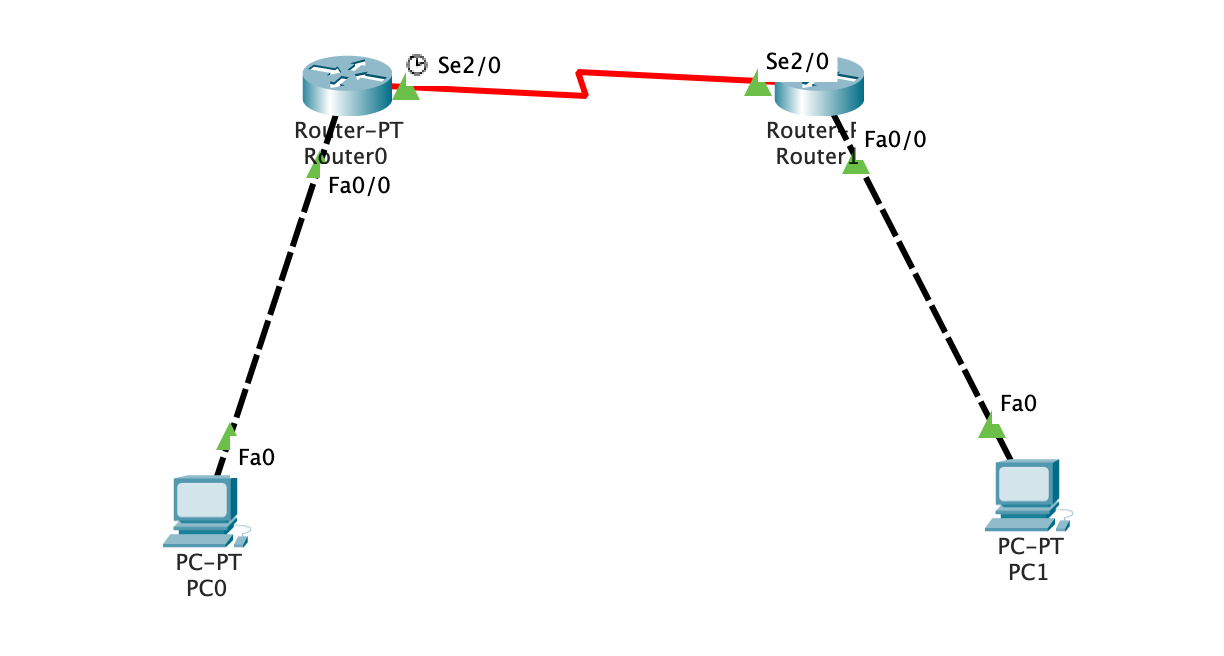
Router>enable Router#configure terminal Enter configuration commands, one per line. End with CNTL/Z. Router(config)#interface FastEthernet0/0 Router(config-if)#ip address 192.168.1.1 255.255.255.0 Router(config-if)#no shutdown Router(config-if)#exit Router(config)#interface Serial2/0 Router(config-if)#ip address 192.168.3.1 255.255.255.0 Router(config-if)#no shutdown
配置r1
1 2 3 4 5 6 7 8 9 10
Router>enable Router#configure terminal Enter configuration commands, one per line. End with CNTL/Z. Router(config)#interface FastEthernet0/0 Router(config-if)#ip address 192.168.2.1 255.255.255.0 Router(config-if)#no shutdown Router(config-if)#exit Router(config)#interface Serial2/0 Router(config-if)#ip address 192.168.3.2 255.255.255.0 Router(config-if)#no shutdown
配置r0和r1的静态路由
手动在r0上指定pc1所在的网段(192.168.2.0/24)在端口Serial2/0
1
ip route 192.168.2.0 255.255.255.0 Serial2/0
同理, 在r1配置
1
ip route 192.168.1.0 255.255.255.0 Serial2/0
配置完成后查看路由表:
1 2 3 4 5 6 7 8 9 10 11 12 13 14
Router#show ip route Codes: C - connected, S - static, I - IGRP, R - RIP, M - mobile, B - BGP D - EIGRP, EX - EIGRP external, O - OSPF, IA - OSPF inter area N1 - OSPF NSSA external type 1, N2 - OSPF NSSA external type 2 E1 - OSPF external type 1, E2 - OSPF external type 2, E - EGP i - IS-IS, L1 - IS-IS level-1, L2 - IS-IS level-2, ia - IS-IS inter area * - candidate default, U - per-user static route, o - ODR P - periodic downloaded static route
Gateway of last resort is not set
C 192.168.1.0/24 is directly connected, FastEthernet0/0 S 192.168.2.0/24 is directly connected, Serial2/0 C 192.168.3.0/24 is directly connected, Serial2/0
测试
完成后分别在r0和pc0上测试ping pc1
1 2 3 4 5 6
Router#ping 192.168.2.2
Type escape sequence to abort. Sending 5, 100-byte ICMP Echos to 192.168.2.2, timeout is2 seconds: !!!!! Success rate is100 percent (5/5), round-trip min/avg/max = 1/10/23 ms
Ping statistics for192.168.2.2: Packets: Sent = 4, Received = 4, Lost = 0 (0% loss), Approximate round trip times in milli-seconds: Minimum = 1ms, Maximum = 6ms, Average = 2ms
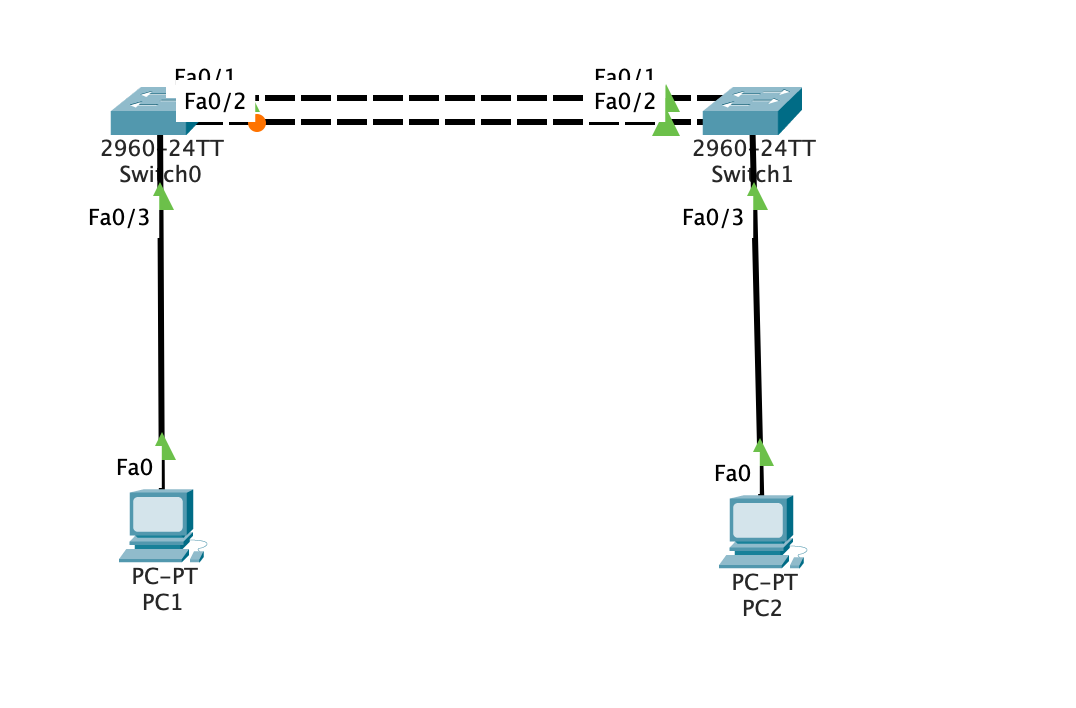
Switch#sh spanning-tree VLAN0001 Spanning tree enabled protocol rstp Root ID Priority 32769 Address 00D0.BC2B.9D5B Cost 19 Port 1(FastEthernet0/1) Hello Time 2 sec Max Age 20 sec Forward Delay 15 sec
Bridge ID Priority 32769 (priority 32768 sys-id-ext 1) Address 00E0.F9A2.673A Hello Time 2 sec Max Age 20 sec Forward Delay 15 sec Aging Time 20
设置三层交换机 VLAN 间的通信,创建 VLAN2,VLAN3 的虚接口,并配置虚接口 VLAN2、VLAN3 的 IP 地址。
查看三层交换机路由表。
将二层交换机 VLAN2、VLAN3 下的主机默认网关分别设置为相应虚拟接口的 IP 地址。
验证二层交换机 VLAN2,VALN3 下的主机之间可以相互通信。
实验记录
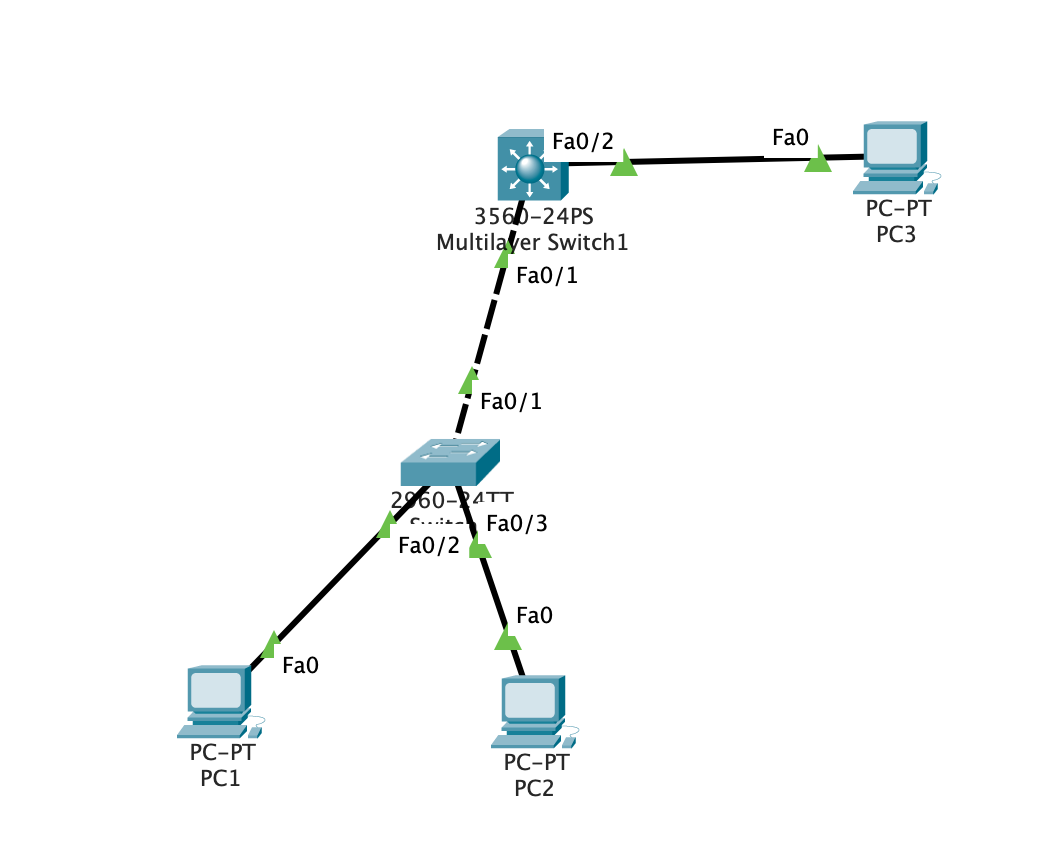
拖出所有组件, 配置 IP 并连接
三台 PC 机的 ip, mask, gateway
1 2 3 4 5 6 7 8 9 10 11 12 13 14
PC1 192.168.1.2 255.255.255.0 192.168.1.1
PC2 192.168.2.2 255.255.255.0 192.168.2.1
PC3 192.168.1.3 255.255.255.0 192.168.1.1
配置二层交换机并查看结果
1 2 3 4 5 6 7 8 9 10 11 12 13 14 15
en conf t vlan 2 exit vlan 3 exit int fa 0/2 switchport access vlan 2 int fa 0/3 switchport access vlan 3 int fa 0/1 switchport mode trunk exit exit show vlan
Primary Secondary Type Ports ------- --------- ----------------- ------------------------------------------
可以看到成功配置了两个VLAN应用在不同的端口.
初步配置三层交换机:
1 2 3 4 5 6 7 8 9 10 11 12 13
en conf t vlan 2 exit vlan 3 exit int fa 0/1 switchport trunk encapsulation dot1q switchport mode trunk exit int fa 0/2 switchport access vlan 2 exit
1 2 3 4 5 6 7 8 9 10 11 12 13 14 15
Switch> Switch>en Switch#conf t Enter configuration commands, one per line. End with CNTL/Z. Switch(config)#vlan 2 Switch(config-vlan)#exit Switch(config)#vlan 3 Switch(config-vlan)#exit Switch(config)#int fa 0/1 Switch(config-if)#switchport trunk encapsulation dot1q Switch(config-if)#switchport mode trunk Switch(config-if)#exit Switch(config)#int fa 0/2 Switch(config-if)#switchport access vlan 2 Switch(config-if)#exit
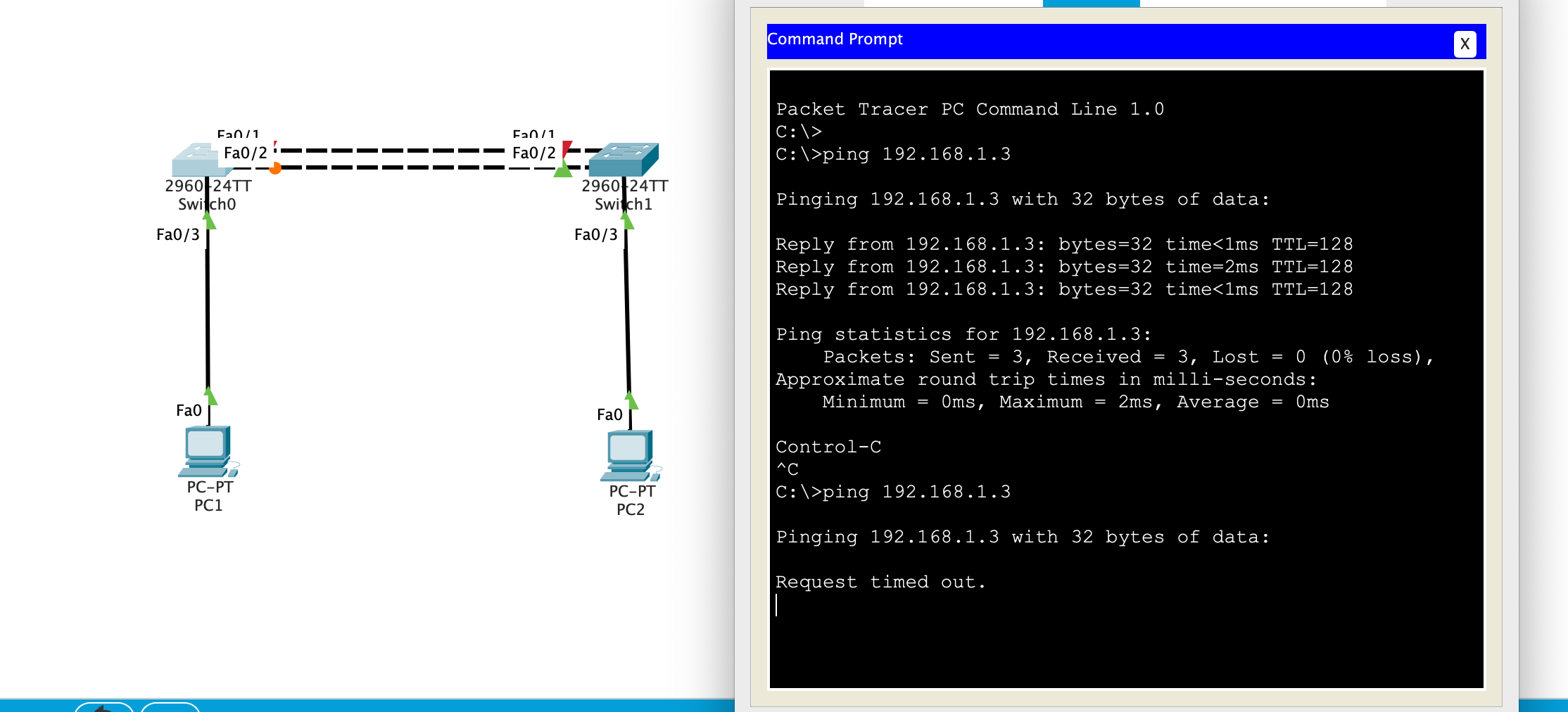
Ping statistics for192.168.1.3: Packets: Sent = 3, Received = 3, Lost = 0 (0% loss), Approximate round trip times in milli-seconds: Minimum = 0ms, Maximum = 1ms, Average = 0ms
Control-C ^C C:\>ping 192.168.2.2
Pinging 192.168.2.2 with 32 bytes of data:
Ping statistics for192.168.2.2: Packets: Sent = 1, Received = 0, Lost = 1 (100% loss),
同一 VLAN 下可以 ping 通, 不同 VLAN 无法 ping 通
配置三层交换机的路由:
1 2 3 4 5 6 7 8 9 10 11 12
ip routing interface vlan 2 ip address 192.168.1.1 255.255.255.0 no shutdown exit interface vlan 3 ip address 192.168.2.1 255.255.255.0 no shutdown exit exit show ip route show vlan
Switch(config)#ip routing Switch(config)#interface vlan 2 Switch(config-if)#ip address 192.168.1.1 255.255.255.0 Switch(config-if)#no shutdown Switch(config-if)#exit Switch(config)#interface vlan 3 Switch(config-if)#ip address 192.168.2.1 255.255.255.0 Switch(config-if)#no shutdown Switch(config-if)#exit Switch(config)#exit Switch#show ip route Codes: C - connected, S - static, I - IGRP, R - RIP, M - mobile, B - BGP D - EIGRP, EX - EIGRP external, O - OSPF, IA - OSPF inter area N1 - OSPF NSSA external type 1, N2 - OSPF NSSA external type 2 E1 - OSPF external type 1, E2 - OSPF external type 2, E - EGP i - IS-IS, L1 - IS-IS level-1, L2 - IS-IS level-2, ia - IS-IS inter area * - candidate default, U - per-user static route, o - ODR P - periodic downloaded static route
Gateway of last resort is not set
C 192.168.1.0/24 is directly connected, Vlan2 C 192.168.2.0/24 is directly connected, Vlan3
Switch#show vlan %LINK-5-CHANGED: Interface Vlan2, changed state to up
%LINEPROTO-5-UPDOWN: Line protocol on Interface Vlan2, changed state to up
%LINK-5-CHANGED: Interface Vlan3, changed state to up
%LINEPROTO-5-UPDOWN: Line protocol on Interface Vlan3, changed state to up
%SYS-5-CONFIG_I: Configured from console by console
VLAN Name Status Ports ---- -------------------------------- --------- ------------------------------- 1 default active Fa0/3, Fa0/4, Fa0/5, Fa0/6 Fa0/7, Fa0/8, Fa0/9, Fa0/10 Fa0/11, Fa0/12, Fa0/13, Fa0/14 Fa0/15, Fa0/16, Fa0/17, Fa0/18 Fa0/19, Fa0/20, Fa0/21, Fa0/22 Fa0/23, Fa0/24, Gig0/1, Gig0/2 2 VLAN0002 active Fa0/2 3 VLAN0003 active 1002 fddi-default active 1003 token-ring-default active 1004 fddinet-default active 1005 trnet-default active
Ping statistics for192.168.2.2: Packets: Sent = 4, Received = 4, Lost = 0 (0% loss), Approximate round trip times in milli-seconds: Minimum = 0ms, Maximum = 1ms, Average = 0ms
可以 ping 通, 符合预期.
小结:
ip routing 语句在实验手册中没有, 但是影响很大, 不开启 ip route 功能会导致三层交换机的路由无效
To enable IEEE 802.1Q encapsulation of traffic on a specified subinterface, use the encapsulation dot1q command. To disable encapsulation, use the no form of this command.
为什么 802.1Q 协议是必须的?
SW2(config-if)#switchport mode trunk Command rejected: An interface whose trunk encapsulation is “Auto” can not be configured to “trunk” mode.
SW1(config-if)#switchport trunk encapsulation ?
dot1q Interface uses only 802.1q trunking encapsulation when trunking
isl Interface uses only ISL trunking encapsulation when trunking
negotiate Device will negotiate trunking encapsulation with peer on interface
Never done any kind of binary exploitation before? This should get you started. Grab some gdb or radare, turn off ASLR, forget about stack canaries, and let the fun begin.
unsignedcharchar_to_repr(char in){ if (in >= '0' && in <= '9') return in - '0'; if (in >= 'a' && in <= 'f') return in - 'a' + 0xa; if (in >= 'A' && in <= 'F') return in - 'A' + 0xa; assert("not in hex digit range" && 0); }
voidhex_to_binary(char *in, unsignedchar* out, size_t length){ size_t i; assert("length must be even" && (length % 2) == 0);
length /= 2; for (i = 0; i < length; i++) { out[i] = char_to_repr(in[i * 2]) << 4 | char_to_repr(in[i * 2 + 1]); } }
/* read flag */ int fd = open("flag.txt", O_RDONLY); assert("unable to open flag file" && fd >= 0); flag[read(fd, flag, sizeof(flag))] = '\0'; close(fd);
puts("It's easy. Give me MD5($flag), get $flag in return.");
/* if md5 is correct, print flag */ if(check_user_hash(flag)) { puts(flag); } else { puts("nope"); }
if guess == secrets.token_hex(16): return'Nice guess! Your flag is {}'.format(FLAG) elif guess == "giveup": return'Give up is OK, sweet gift for you: {}'.format(GIFT)
fs = ('Better luck next time!<br/>' 'Your IP: {r.remote_addr}<br/>' 'Your User Agent: {r.user_agent}<br/>' 'Your Guess: ' + html.escape(guess)) return fs.format(r=request)
if __name__ == '__main__': app.run(host='0.0.0.0', port=15000)
#Let's get rid of some imports %matplotlib inline import matplotlib.pyplot as plt import numpy as np #Define the model import torch import torch.nn as nn import torch.nn.functional as F
defread_text(): with open("boston_housing.txt") as f: r_list = [i.replace("\n", "") for i in f.readlines()]
des_part = r_list[7:21] data_part = r_list[22:]
des_part = [s.split()[0].strip() for s in des_part] data_part = [ data_part[i] + data_part[i + 1] for i in range(0, len(data_part), 2) ] df = pd.read_csv(StringIO("\n".join(data_part)), sep="\s+", header=None, names=des_part)
# print(df.head()) return df
boston_df = read_text() boston_df.head()
CRIM
ZN
INDUS
CHAS
NOX
RM
AGE
DIS
RAD
TAX
PTRATIO
B
LSTAT
MEDV
0
0.00632
18.0
2.31
0
0.538
6.575
65.2
4.0900
1
296.0
15.3
396.90
4.98
24.0
1
0.02731
0.0
7.07
0
0.469
6.421
78.9
4.9671
2
242.0
17.8
396.90
9.14
21.6
2
0.02729
0.0
7.07
0
0.469
7.185
61.1
4.9671
2
242.0
17.8
392.83
4.03
34.7
3
0.03237
0.0
2.18
0
0.458
6.998
45.8
6.0622
3
222.0
18.7
394.63
2.94
33.4
4
0.06905
0.0
2.18
0
0.458
7.147
54.2
6.0622
3
222.0
18.7
396.90
5.33
36.2
属性意义:
CHAS 和 RAD 应该是离散量
- CRIM per capita crime rate by town
- ZN proportion of residential land zoned for lots over 25,000 sq.ft.
- INDUS proportion of non-retail business acres per town
- CHAS Charles River dummy variable (= 1 if tract bounds river; 0 otherwise)
- NOX nitric oxides concentration (parts per 10 million)
- RM average number of rooms per dwelling
- AGE proportion of owner-occupied units built prior to 1940
- DIS weighted distances to five Boston employment centres
- RAD index of accessibility to radial highways
- TAX full-value property-tax rate per 10,000
- PTRATIO pupil-teacher ratio by town
- B 1000(Bk - 0.63)^2 where Bk is the proportion of blacks by town
- LSTAT % lower status of the population
- MEDV Median value of owner-occupied homes in 1000's
接下来检查数据特征和质量
1
boston_df.describe()
CRIM
ZN
INDUS
CHAS
NOX
RM
AGE
DIS
RAD
TAX
PTRATIO
B
LSTAT
MEDV
count
506.000000
506.000000
506.000000
506.000000
506.000000
506.000000
506.000000
506.000000
506.000000
506.000000
506.000000
506.000000
506.000000
506.000000
mean
3.613524
11.363636
11.136779
0.069170
0.554695
6.284634
68.574901
3.795043
9.549407
408.237154
18.455534
356.674032
12.653063
22.532806
std
8.601545
23.322453
6.860353
0.253994
0.115878
0.702617
28.148861
2.105710
8.707259
168.537116
2.164946
91.294864
7.141062
9.197104
min
0.006320
0.000000
0.460000
0.000000
0.385000
3.561000
2.900000
1.129600
1.000000
187.000000
12.600000
0.320000
1.730000
5.000000
25%
0.082045
0.000000
5.190000
0.000000
0.449000
5.885500
45.025000
2.100175
4.000000
279.000000
17.400000
375.377500
6.950000
17.025000
50%
0.256510
0.000000
9.690000
0.000000
0.538000
6.208500
77.500000
3.207450
5.000000
330.000000
19.050000
391.440000
11.360000
21.200000
75%
3.677082
12.500000
18.100000
0.000000
0.624000
6.623500
94.075000
5.188425
24.000000
666.000000
20.200000
396.225000
16.955000
25.000000
max
88.976200
100.000000
27.740000
1.000000
0.871000
8.780000
100.000000
12.126500
24.000000
711.000000
22.000000
396.900000
37.970000
50.000000
1 2 3
import numpy as np #check for missing values print(np.sum(np.isnan(boston_df)))
CRIM 0
ZN 0
INDUS 0
CHAS 0
NOX 0
RM 0
AGE 0
DIS 0
RAD 0
TAX 0
PTRATIO 0
B 0
LSTAT 0
MEDV 0
dtype: int64
分析数据
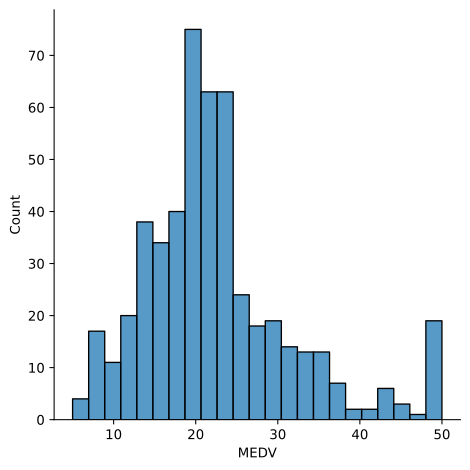
首先,让我们关注因变量,大部分情况下存在正态分布,其中一些位于分布的顶端,我们稍后将进行探讨。
然后关注数据集中的相关系数分布
1 2 3 4
#Let's us seaborn, because it is pretty. ;) #See more here. http://seaborn.pydata.org/tutorial/distributions.html import seaborn as sns sns.displot(boston_df['MEDV']);
defget_tag_columns(df, limit=10): '''find cols contains continuous data''' ret = [] for col in df.columns: if df[col].nunique() < limit: ret.append(col) return ret
1 2 3 4 5 6 7 8 9 10 11 12 13 14 15 16 17 18
from sklearn.preprocessing import StandardScaler, OneHotEncoder
# Standard ss = StandardScaler() X = np.concatenate([ss.fit_transform(one_hot_df), df.drop(tags, axis=1).values], axis=1) return X.astype("float32"), y.astype("float32")
1 2 3 4 5 6 7 8 9 10 11 12 13 14 15 16
#This will throw and error at import if haven't upgraded. # from sklearn.cross_validation import train_test_split from sklearn.model_selection import train_test_split #y is the dependent variable. # y = boston_df['MEDV'].values # # As we know, iloc is used to slice the array by index number. Here this is the matrix of # # independent variables. # X = boston_df.iloc[:,0:-1].values
X, y = preprocess(boston_df)
# Split the data into a training set and a test set X_train, X_test, y_train, y_test = train_test_split(X, y, test_size=0.3, random_state=0)
#Calculate some other hyperparameters based on data. batch_no = len(X_train) // batch_size #batches cols=X_train.shape[1] #Number of columns in input matrix n_output=1
1 2 3 4 5 6 7 8 9 10 11 12 13 14 15
#Create the model device = torch.device("cuda:0"if torch.cuda.is_available() else"cpu") # Assume that we are on a CUDA machine, then this should print a CUDA device: print("Executing the model on :",device) classNet(torch.nn.Module): def__init__(self, n_feature, size_hidden, n_output): super(Net, self).__init__() self.hidden = torch.nn.Linear(cols, size_hidden) # hidden layer self.predict = torch.nn.Linear(size_hidden, n_output) # output layer
defforward(self, x): x = F.relu(self.hidden(x)) # activation function for hidden layer x = self.predict(x) # linear output return x net = Net(cols, size_hidden, n_output)
Executing the model on : cuda:0
1
2
3
4
#Adam is a specific flavor of gradient decent which is typically better
optimizer = torch.optim.Adam(net.parameters(), lr=learning_rate)
#optimizer = torch.optim.SGD(net.parameters(), lr=0.2)
criterion = torch.nn.MSELoss(reduction='sum')  # this is for regression mean squared loss
import pandas as pd from sklearn.metrics import r2_score
running_loss = 0.0 for epoch in range(num_epochs): #Shuffle just mixes up the dataset between epocs # X_train, y_train = shuffle(X_train, y_train) # Mini batch learning net.train() for inputs,labels in train_loader: # start = i * batch_size # end = start + batch_size # inputs = Variable(torch.FloatTensor(X_train[start:end])) # labels = Variable(torch.FloatTensor(y_train[start:end])) # zero the parameter gradients optimizer.zero_grad()